Use Builder Pattern for Integrations
Organize your Integrations
In the metadata, we are saving Endpoint-specific information that won’t change in any condition. Note the “Credentials” column, there we can store Named Credentials name to use in Apex…

Are you working in an environment that is heavily relying on integration? Do you struggle with a lot of Apex class integrations?
Introduce those easy changes to make your life easier!
Firstly, create simple metadata with all the endpoints:
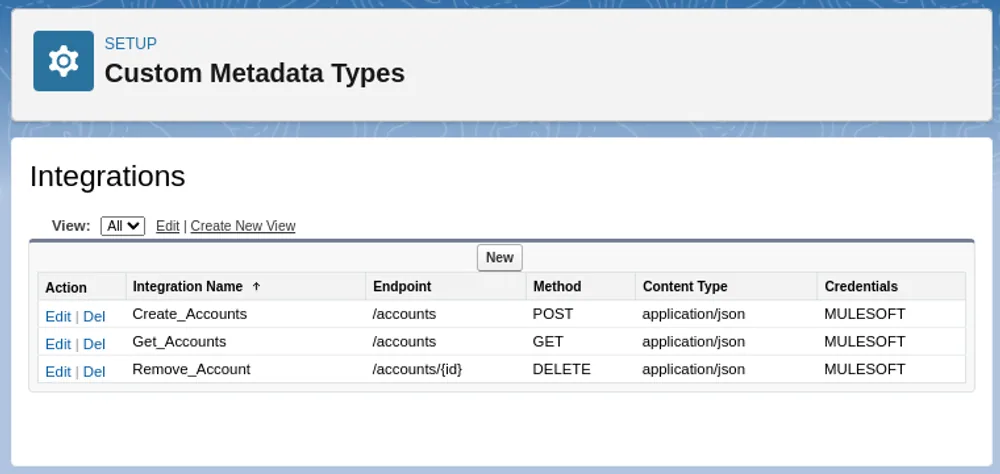
In the metadata, we are saving Endpoint-specific information that won’t change in any condition. Note the “Credentials” column, there we can store Named Credentials name to use in Apex class.
Now let's add some abstraction on top of the standard HTTP class:
public class HttpBuilder {
    private Integrations__mdt metadata;
    private Map<String, String> headers = new Map<String, String>();
    private Map<String, String> params = new Map<String, String>();
    private String body = null;
    private Integer timeout = 120000;

    public HttpBuilder(String metadata) {
        this.metadata = Integrations__mdt.getInstance(metadata);
    }

    public HttpBuilder buildHeader(String key, String value) {
        this.headers.put(key, value);
        return this;
    }

    public HttpBuilder buildParam(String key, String value) {
        this.params.put(key, value);
        return this;
    }

    public HttpBuilder buildBody(String body) {
        this.body = body;
        return this;
    }

    public HttpBuilder buildTimeout(Integer timeout) {
        this.timeout = timeout;
        return this;
    }
}
And finally, build the request:
public HttpRequest build() {
    HttpRequest request = new HttpRequest();

    request.setEndpoint(getAddress(metadata.Credentials__c, metadata.Endpoint__c, params));

    request.setMethod(metadata.Method__c);
    request.setHeader('Content-Type', metadata.Content_Type__c);

    for (String key : headers.keySet()) {
        request.setHeader(key, headers.get(key));
    }

    if (String.isNotBlank(body)) {
        request.setBody(body);
    }
    request.setTimeout(timeout);

    return request;
}

private String getAddress(String credentials, String endpoint, Map<String, String> params) {
    for (String key : params.keySet()) {
        endpoint += '&' + key + '=' + params.get(key);
    }

    endpoint = endpoint.replaceFirst('&', '?');
    return 'callout:' + credentials + '/' + endpoint;
}
Final result:
public static HttpResponse getStandardAccounts() {
    HttpRequest request = new HttpRequest();
    request.setEndpoint('callout:MULESOFT/get_accounts');
    request.setMethod('GET');
    request.setHeader('Content-Type', 'application/json');
    request.setTimeout(60000);

    return new Http().send(request);
}public static HttpResponse getBuilderAccounts() {
HttpRequest request = new HttpBuilder('Get_Accounts').buildTimeout(60000).build();
return new Http().send(request);
}By using Custom Metadata, we can create a Builder class which provides an abstraction over the standard HttpRequest class. In the builder we are covering often duplicated code, such as setting method, endpoint etc. Thanks to that, we can create HttpRequest in only one line!