Avoid too many Queueable jobs
Avoid “Too many queueable jobs...” error with Async Lib
That means that in the sync context, you can enqueue up to 50 queueables, 50 futures, and 100 batches, but in a queueable context, only 1 queueable and 50 futures.

Ever hit the “Too many queueable jobs” error due to multiple async entry points? Or tried using @future methods, only to run into the 50-per-transaction limit?
Maybe you used if (System.isFuture() && System.isBatch() && ...) checks to skip logic in async contexts—just to avoid the limits?
Let’s be honest: that’s a workaround, not a solution.
If any of this sounds familiar, this tip is for you.
Know platform limits
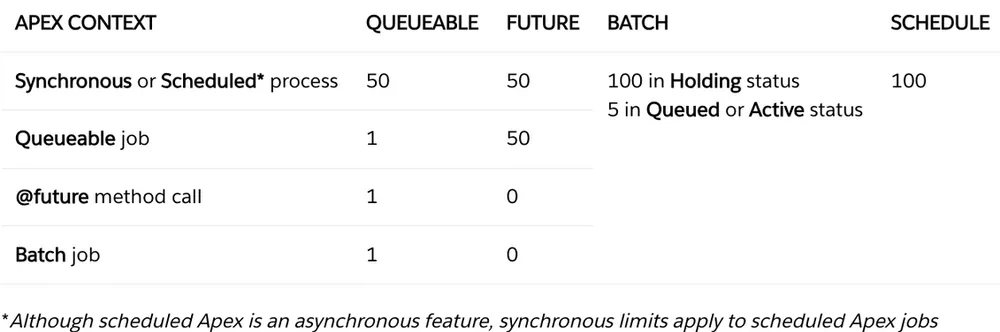
That means that in the sync context, you can enqueue up to 50 queueables, 50 futures, and 100 batches, but in a queueable context, only 1 queueable and 50 futures.
Total Apex async jobs (future, queueable, batch, scheduled) are capped at 250,000 per 24 hours.
Check if you are within the limits
if (Limits.getQueueableJobs() < Limits.getLimitQueueableJobs()) {
    System.enqueueJob(new MyQueueableJob());
}
This way you can prevent the limit errors in synchronous and asynchronous context, where you have only 1 job that can be enqueued!
Avoid enqueueing queueable jobs in Triggers or loops
public class MyTriggerHandler {
    public static void execute() {
        // some conditions
        System.enqueueJob(new MyQueueableJob());
    }
}
Unless you are sure you know what you are doing, it is not recommended to enqueue queueable jobs in Triggers, due to the number of them that can be created.
But what if you need to enqueue more than the limit allows (especially in Queueable context)?
You can: 1.Specify logic to chain the queues when above the limit, in tandem with AsyncOptions. 2.Use Async Lib to manage the queueable jobs, and automatically enqueue the Queueable chain when needed.
// QueueableJob class example
public class MyQueueableJob extends QueueableJob {
    public override void work() {
        // To access the current job context
        Async.QueueableJobContext ctx = Async.getQueueableJobContext();
        // Your logic here
    }
}

//Trigger Handler
public class MyTriggerHandler {
    public static void execute() {
        // some conditions
        Async.queueable(new MyQueueableJob())
            .enqueue();
    }
}
Considerations
Even though the Async Lib framework allows to safely enqueue Queueable Jobs above the Apex Salesforce Limits, it can still lead to unexpected issues or slow down asynchronous execution in Flex Queue due to the number of running jobs.
Total Apex async jobs (future, queueable, batch, scheduled) limit is still valid.