HTTP status codes
Do you know the meaning of HTTP response status codes?
The value returned when an external ID exists in more than one record. The response body contains the list of matching records.

Probably, you are used to the following:
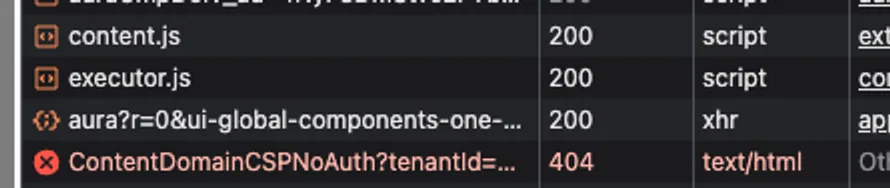
But do you know there are many more codes, and all have a meaning to them?
You can check the below list of some status codes for standard Salesforce APIs:
Description
HTTP response code
“OK” success code, for GET, HEAD, and some PATCH requests.
The value returned when an external ID exists in more than one record. The response body contains the list of matching records.
The request content hasn’t changed since a specified date and time. The date and time is provided in a If- Modified-Since header. See Get Object Metatdata Changes for an example.
The request couldn’t be understood, usually because the JSON or XML body contains an error.
The session ID or OAuth token used has expired or is invalid. The response body contains the message and errorCode.
The request has been refused. Verify that the logged-in user has appropriate permissions. If the error code is REQUEST_LIMIT_EXCEEDED, you’ve exceeded API request limits in your org.
The requested resource couldn’t be found. Check the URI for errors, and verify that there are no sharing issues.
The length of the URI exceeds the 16,384-byte limit.
Salesforce Edge doesn’t have routing information available for this request host. Contact Salesforce Customer Support.
The combined length of the URI and headers exceeds the 16,384-byte limit.
Salesforce Edge wasn’t able to communicate successfully with the Salesforce instance.
Knowing what Salesforce means by status code is useful, but sometimes we need to create our own endpoints, what in that situation?
In those cases, we should follow industry standards, for example RFC 9110, some example codes and meanings below:
Description
HTTP response code
Indicates that the request has succeeded. The content sent in a 200 response depends on the request method. For GET method, it would mean that the resource has been fetched and transmitted in the message body.
Server has successfully fulfilled the request and that there is no additional content to send in the response content.
The target resource has been assigned a new permanent URI and any future references to this resource ought to use one of the enclosed URIs.
Access to the target resource is no longer available at the origin server and that this condition is likely to be permanent.
The expectation given in the request's Expect header field could not be met by at least one of the inbound servers.
It is a good practice for our APIs to return proper codes as a response!
How can you do it with Rest Apex?
Status Code
Description
CREATED
Use RestContext.response.statusCode to assign one of the status codes from the list on right (unfortunately, Salesforce allows only those codes as a response).
ACCEPTED
NO_CONTENT
PARTIAL_CONTENT
MULTIPLE_CHOICES
MOVED_PERMANENTLY
FOUND
NOT_MODIFIED
BAD_REQUEST
UNAUTHORIZED
FORBIDDEN
@RestResource(urlMapping='/ImportantEndpoint/*')
global with sharing class ImportantEndpointCallback {
    @HttpPost
    global static ResponseWrapper importantEndpoint() {
        try {
            ...some code...
        } catch (Exception e) {
            RestContext.response.statusCode = 302;
            return new ErrorWrapper(e);
        }

        return new SuccessWrapper();
    }
}
NOT_FOUND
METHOD_NOT_ALLOWED
NOT_ACCEPTABLE
CONFLICT
GONE
PRECONDITION_FAILED
REQUEST_ENTITY_TOO_LARGE
REQUEST_URI_TOO_LARGE
UNSUPPORTED_MEDIA_TYPE
EXPECTATION_FAILED
Check post description for links to resource material!
INTERNAL_SERVER_ERROR
SERVER_UNAVAILABLE