How to use errorCallback
LWC have dedicated errorCallback lifecycle hook, which can catch any uncaught errors from descendent components in its tree!

How to use errorCallback
LWC have dedicated errorCallback lifecycle hook, which can catch any uncaught errors from descendent components in its tree!
import { LightningElement } from 'lwc';

export default class ErrorCallback extends LightningElement {
    errorCallback(error) {

    }
}
Let’s create two components: JavascriptError and ForcedError and simulate some errors.
import { LightningElement } from 'lwc';

export default class JavascriptError extends LightningElement {
    connectedCallback() {
        throw new Error('Javascript error!');
    }
}import { LightningElement } from 'lwc';
export default class ForcedError extends LightningElement {
handleClick() {
throw new Error('Forced error!');
}
}Both our components are inside of ErrorCallback component. We’re gonna print our errors with console.error.
import { LightningElement } from 'lwc';

export default class ErrorCallback extends LightningElement {
    errorCallback(error, stack) {
        console.error(error.message);
        console.error(stack);
    }
}
Our first error came from connectedCallback in JavascriptError component - you can see its name in stack part.
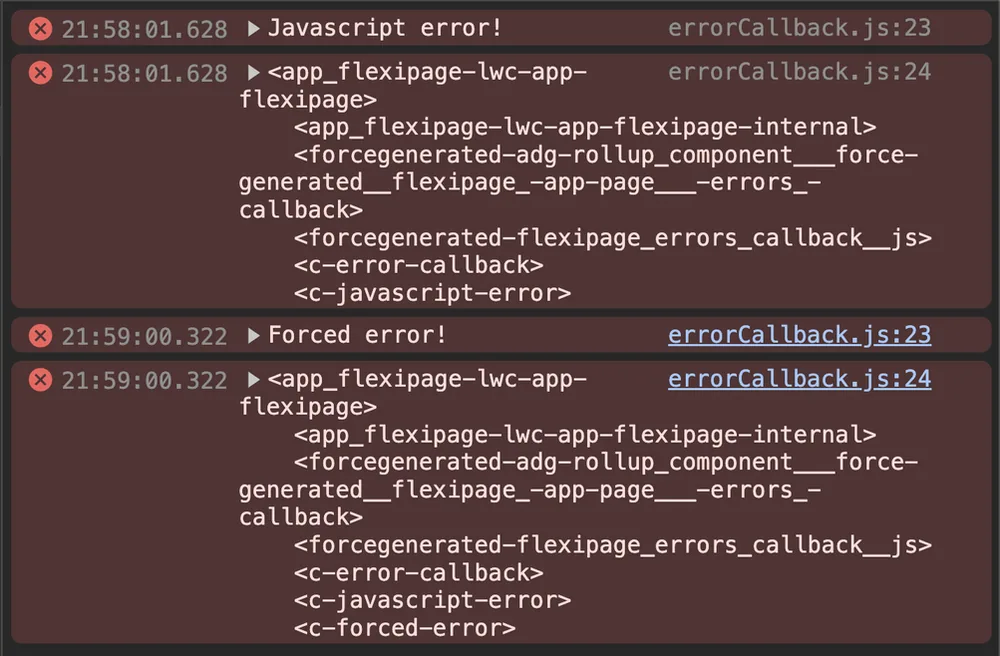
Second error appeared after button click - which triggered handleClick function.
It’s worth to mention that errorCallback won’t catch an error thrown during asynchronous operations like promises or timeouts - those types of errors you’ll have to handle on your own!