GET URL Params
URL Params in LWC
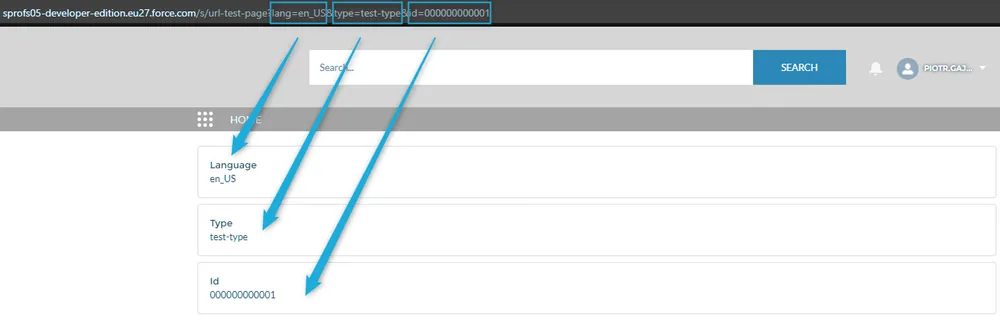
The easiest way to obtain URL parameters is by using CurrentPageReference. Below, you can find an example of currentPageReference. As you can see, all parameters are stored in the state…

How to get URL Params in LWC?
The easiest way to obtain URL parameters is by using CurrentPageReference. Below, you can find an example of currentPageReference. As you can see, all parameters are stored in the state property.
javascript
// currentPageReference
{
    attributes: {
        name: URL_Test_Page__c
    },
    state: {
        lang: en_US,
        type: test-type,
        id: 000000000001
    },
    type: comm__namedPage
}
Add the @wire(CurrentPageReference) method to your LWC component. The method will automatically fire every time URL parameters change.
javascript
import { LightningElement, wire } from 'lwc';
import { CurrentPageReference } from 'lightning/navigation';

export default class MyComponentName extends LightningElement {

    urlId = null;
    urlLanguage = null;
    urlType = null;

    @wire(CurrentPageReference)
    getStateParameters(currentPageReference) {
        if (currentPageReference) {
            this.urlId = currentPageReference.state?.id;
            this.urlLanguage = currentPageReference.state?.lang;
            this.urlType = currentPageReference.state?.type;
        }
    }
}