---
title: "Salesforce SPA using LWC"
url: "https://blog.beyondthecloud.dev/blog/salesforce-spa-using-lwc"
author: "Piotr Gajek"
published: "2022-08-27"
updated: "2022-09-28"
tags: "salesforce community spa, salesforce lwc spa, salesforce single page application, salesforce single page application lwc, salesforce spa"
---
# Salesforce SPA using LWC
By [Piotr Gajek](https://blog.beyondthecloud.dev/author/piotr-gajek.md), August 27, 2022
Hello there!
How to create a **Single Page Application (SPA)** using Lightning Web Components?
Code is really simple, extendable, and very efficient.
Let’s begin!
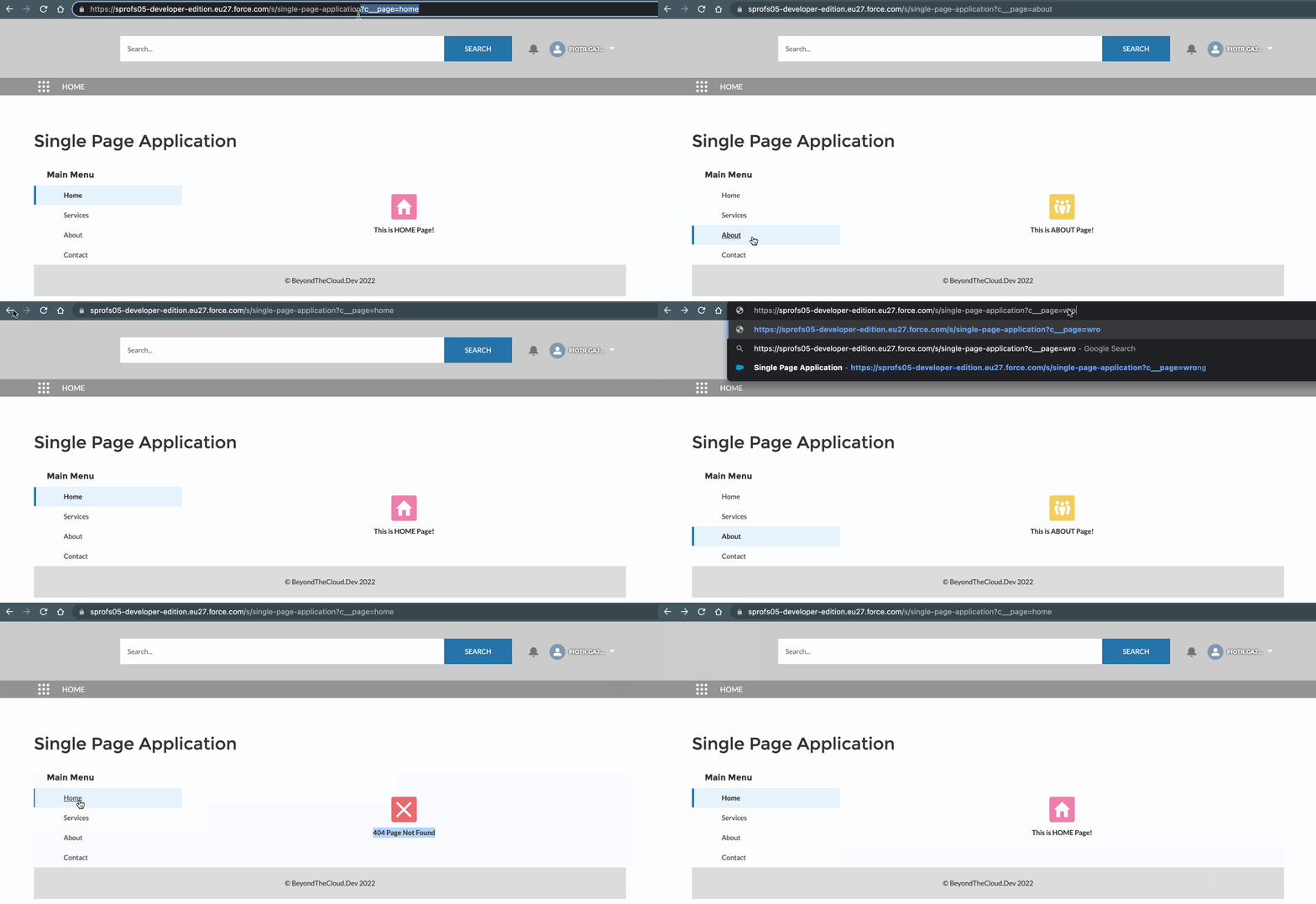
## Demo
## Architecture

* `spaContainer` – can be dragged & drop to the lightning or the experience cloud page (internal, external usage). The container is a kind of static layout that does not change when navigating. The whole structure is loaded once.
* `spaNavigation` – allows navigate between pages.
* `spaPages` – contains page id to HTML template mapping. Content change dynamically based on pageId in URL.
* `spaFooter`
## Code
The whole code you can find here: [SPA – LWC](https://github.com/beyond-the-cloud-dev/lwc-spa/tree/main/force-app/main/default/lwc) and [SPA – Apex](https://github.com/beyond-the-cloud-dev/lwc-spa/tree/main/force-app/main/default/classes).
### Container
* The brain of Single Page Application.
* It can be treated as a Layout, that contains static components.
* Use `wiredCurrentPageReference` to get information about current page. **It fires every time the URL will change**.
* Use `wiredPagesConfig` to get page configs from the apex. In the current solution, the configuration is hardcoded, but you can prepare custom metadata to store the whole config and manage the application from the Salesforce interface.
```html
// spaContainer.html
Single Page Application
```
```js
// spaContainer.js
import { LightningElement, wire } from 'lwc';
import { CurrentPageReference } from 'lightning/navigation';
import getPagesConfig from '@salesforce/apex/SpaController.getPagesConfig';
export default class SpaContainer extends LightningElement {
currentPageReference;
pagesConfig;
menuItems;
currentPageId;
isCurrentPageReferenceLoaded = false;
isPagesConfigLoaded = false;
@wire(CurrentPageReference)
wiredCurrentPageReference(currentPageReference) {
if (!currentPageReference) {
return;
}
this.currentPageReference = currentPageReference;
this.isCurrentPageReferenceLoaded = true;
this.setCurrentPage();
}
@wire(getPagesConfig)
wiredPagesConfig({ data }) {
if (!data) {
return;
}
this.pagesConfig = data;
this.setNavigationMenu();
this.setLandingPage();
this.isPagesConfigLoaded = true;
this.setCurrentPage();
}
get isLoaded() {
return this.isCurrentPageReferenceLoaded && this.isPagesConfigLoaded;
}
setNavigationMenu() {
this.menuItems = [...this.pagesConfig]
.sort((a, b) => (a.menuOrder > b.menuOrder ? 1 : -1))
.map(page => ({
label: page.name,
pageId: page.pageId
}));
}
setLandingPage() {
this.landingPage = this.pagesConfig.find(page => page.isLandingPage);
}
setCurrentPage() {
if (!this.isLoaded) {
return;
}
this.currentPageId = this.currentPageReference?.state?.c__page || this.landingPage?.pageId;
}
}
```
### Navigation
* `navigate` replace `c__page` in url, what automatically fires `wiredCurrentPageReference` from `spaContainer.js`.
```html
// spaNavigation.html
```
```js
// spaNavigation.js
import { LightningElement, api } from 'lwc';
import { NavigationMixin } from 'lightning/navigation';
export default class SpaNavigation extends NavigationMixin(LightningElement) {
@api currentPageId;
@api menuItems;
@api currentPageReference;
navigate(event) {
this[NavigationMixin.Navigate](
Object.assign({}, this.currentPageReference, {
state: Object.assign({}, this.currentPageReference.state, {
c__page: event.target.dataset.page
})
}),
false // Push to browser history stack
);
}
}
```
### Pages
* Simple mapping between pageId and template.
* Proper page is rendered based on`currentPageId`.
* HTML templates can contain another LWC components.
* Unrecognized `currentPageId` will load `notFound` template.
```js
// spaPages.js
import { LightningElement, api } from 'lwc';
import home from './templates/home.html';
import services from './templates/services.html';
import about from './templates/about.html';
import contact from './templates/contact.html';
import notFound from './templates/404.html';
const PAGE_ID_TO_TEMPLATE = {
home,
services,
about,
contact,
notFound
};
export default class SpaPages extends LightningElement {
@api currentPageId;
render() {
return PAGE_ID_TO_TEMPLATE[this.currentPageId] || PAGE_ID_TO_TEMPLATE.notFound;
}
}
```
## Use Cases
* Application for the Internal Users (Lightning Page) – You can drag & drop the SPA component to Lightning Page and enjoy a great user experience.
* Modals/Popups with a few pages. – Sometimes business process has a few pages where data needs to be provided. Build dynamic UI and improve navigation between pages.
* Application for the External Users (Experience Cloud) – You don’t need to create a lot of pages. Create one, add a SPA component and that’s all!
* Better user experience – Replace the solution where the user needs to jump between different pages and wait for loading.
## Repository
[SPA – LWC](https://github.com/beyond-the-cloud-dev/lwc-spa/tree/main/force-app/main/default/lwc)
[SPA – Apex](https://github.com/beyond-the-cloud-dev/lwc-spa/tree/main/force-app/main/default/classes)
---
If you have any questions feel free to ask in the comment section below. 🙂
Was it helpful? Check out our other great posts [here](https://beyondthecloud.dev/blog).
---
## References
* [Navigation](https://developer.salesforce.com/docs/component-library/bundle/lightning-navigation/documentation)
* [Add Query Parameters](https://developer.salesforce.com/docs/component-library/documentation/en/lwc/lwc.use%5Fnavigate%5Fadd%5Fparams%5Furl)
* [Render Multiple Templates](https://developer.salesforce.com/docs/component-library/documentation/en/lwc/lwc.create%5Frender)